
Live Online Industrial Automation Training for Working Professionals
Upgrade your PLC, SCADA, HMI, drives, industrial networking and automation skills through 1-to-1 live online training. Learn from home using your computer and internet connection with orientation, whiteboard theory, programming, hardware selection, upload/download, networking, simulation and troubleshooting integrated into the learning process.
Upgrade Your Technical Skills Without Leaving Your Job
NCVT Online Training is particularly designed for engineers, technicians and working professionals who want structured industrial training without spending additional time every day travelling to and from a training centre.
1-to-1 Live Training — Like Your Offline Class
Sessions are conducted live through Microsoft Teams, Zoom or Google Meet. You can speak directly with the trainer, share your screen, develop programs, configure software and ask technical questions throughout the session.
Orientation, whiteboard explanations, software configuration, programming, hardware selection, upload/download, networking, simulation and troubleshooting follow the same structured technical learning sequence used in classroom training.
Simple Home Setup
You primarily need a suitable computer, stable internet connection and basic computer / operating-system knowledge. Course-related software and installation guidance are provided as applicable to the selected program.
Spend Your Time Learning — Not Travelling
For a working professional, daily travel to and from a training centre can consume valuable time, money and energy. Online learning allows that time to be invested directly into technical learning, practice, work and personal commitments.
A Complete Live Technical Training Environment
Online training is structured around direct trainer interaction and engineering practice, rather than passive recorded-video learning.
Live Online Training
Attend training remotely from your home, office or another suitable learning location.
1-to-1 Sessions
Individual attention allows the trainer to focus on your knowledge level, questions and objectives.
Software Provided
Required training software and installation guidance are provided or arranged as applicable to the program.
Teams / Zoom / Google Meet
Live training can be conducted through Microsoft Teams, Zoom or Google Meet.
Programming
Write PLC programs, configure automation software, develop HMI screens and create engineering projects.
Hardware Selection
Learn controller, I/O, drive, sensor and interface selection for applications.
Upload / Download
Understand project creation, compilation, downloading, uploading and online-monitoring procedures.
Networking
Learn industrial addressing, data communication, protocol configuration and device integration.
Simulation
Test program logic, screens, process behaviour and communication before live implementation.
Whiteboard Theory
Concepts, architecture, diagrams and engineering theory are explained interactively during sessions.
Troubleshooting
Work through programming, communication, configuration and application faults.
Office Hardware Visit
Online participants can visit NCVT for hardware observation or specific technical queries when required.
The Learning Workflow Remains the Same — Only the Location Changes
NCVT online learning follows the same engineering sequence of understanding, selecting, programming, testing and troubleshooting a technology.
Orientation
Technology, application and industry context.
Theory
Whiteboard, architecture and fundamentals.
Select
Hardware, software, modules and interfaces.
Program
Develop logic, screens and configuration.
Simulate
Test and monitor program behaviour.
Troubleshoot
Diagnose faults and improve engineering confidence.
Industrial Automation & Engineering Training
Select an individual technology or follow a connected learning pathway across industrial automation, control systems and embedded engineering.
NCAP — Certified Automation Professional
A connected professional automation pathway covering PLC, HMI, SCADA, drives, panels, CAD, industrial networking and system integration.
Explore NCAP →PLC Control Systems
Learn PLC architecture, digital and analog I/O, Ladder Logic, sequencing, timers, counters, data, communication and troubleshooting.
Explore PLC →HMI & SCADA Developments
Create industrial screens, MIMICs, animation, alarms, trends, scripts, database connections and PLC communication.
Explore HMI & SCADA →AC Drives & Motor Controls
Learn VFD architecture, motor-control principles, parameter programming, speed control, application selection and PLC integration.
Explore AC Drives →Panel CAD Software
Learn electrical control-panel drawings, GA, IGA, SLD, schematics, BOM, wiring and engineering documentation.
Explore Panel CAD →Embedded Systems
Learn selected Embedded C, ARM, STM32, RTOS, CAN, J1939, Linux, IoT and embedded engineering modules online.
Explore Embedded Systems →Automation Courses
Explore NCVT programs across PLC, SCADA, drives, electrical panels, instrumentation, industrial communication and application workshops.
Browse All Automation Courses →Professional / Corporate Training
Training can be discussed around a professional skill gap, machine application, plant requirement, maintenance problem or team-development objective.
Discuss Your Requirement →NCVT Certified Automation Professional Program
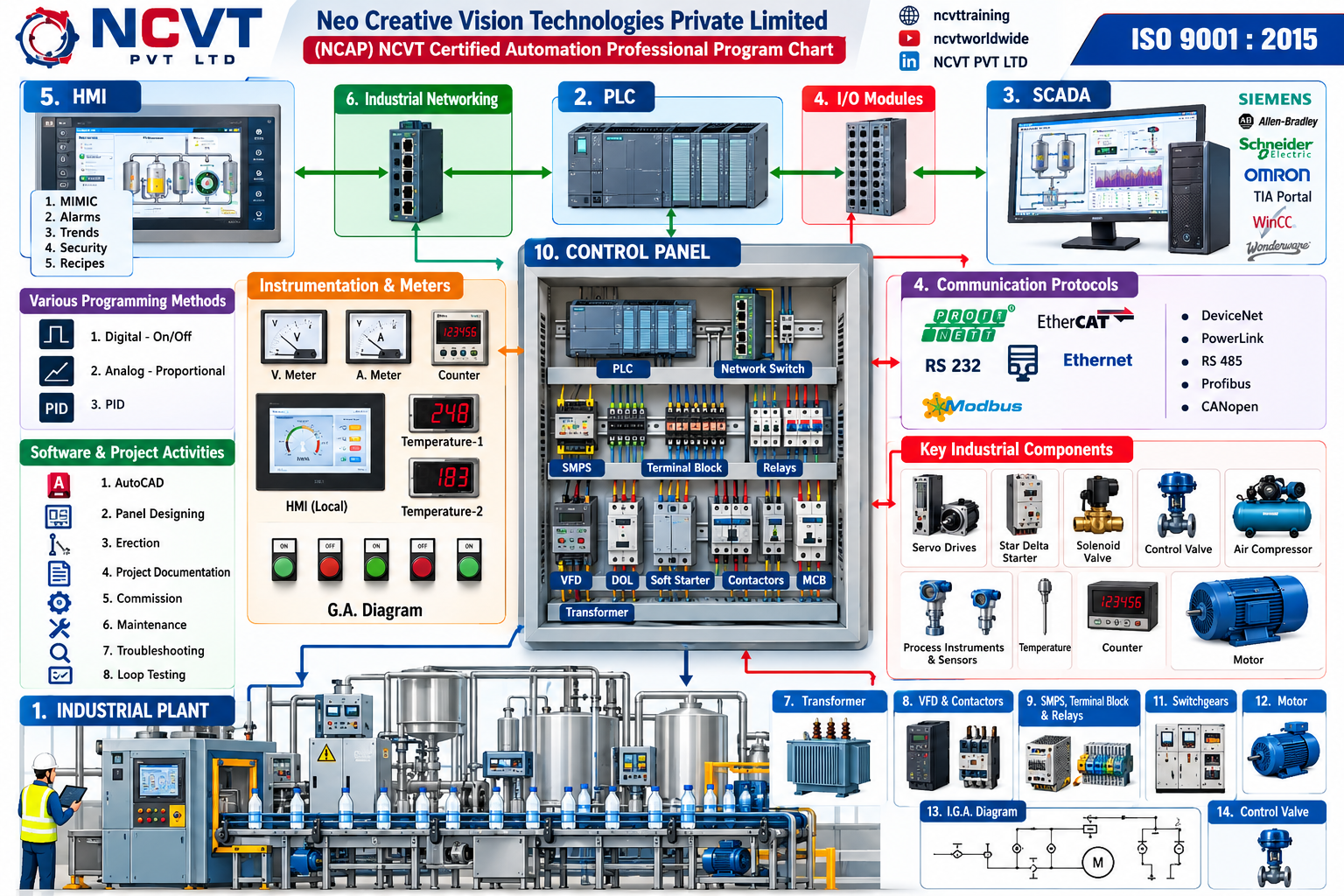
NCAP connects the technologies operating across a complete industrial automation architecture — sensors, PLC, HMI, SCADA, drives, industrial networks, panels and final control devices.
Training That Fits Around Your Work
Online sessions are designed to make technical upskilling manageable alongside professional and personal responsibilities.
Choose the Learning Arrangement That Works for You
1-to-1 Live Training
Personalized instruction, direct questions, screen sharing and progress according to your learning level.
Working Professional
Focus learning around technologies needed for your current or target engineering role.
Small Cohort
A limited group follows a structured curriculum and technical practice plan.
Corporate / Customized
Content can be aligned with a plant, machine, system, maintenance or organizational requirement.
Same Technical Learning Process — Different Location
Online delivery moves the trainer interaction, programming and software work to your computer while keeping NCVT's structured technical learning sequence intact.
| Activity | Online Training | Offline Training |
|---|---|---|
| Trainer Interaction | Live 1-to-1 through Teams, Zoom or Google Meet. | Live face-to-face trainer interaction. |
| Orientation | Live technology and industry orientation. | Classroom orientation. |
| Whiteboard Theory | Digital whiteboard, diagrams and live technical explanation. | Physical whiteboard and classroom discussion. |
| Programming | Participant programs directly on their computer with trainer guidance. | Participant programs on centre systems. |
| Hardware Selection | Selection, architecture, configuration and application are taught live. | Same selection with equipment physically available. |
| Upload / Download | Workflow, configuration, upload/download and online monitoring are taught. | Same workflow with direct lab hardware. |
| Industrial Networking | Addressing, protocols, configuration and data exchange. | Same plus physical network hardware. |
| Simulation | Live software simulation and testing. | Simulation plus physical system testing. |
| Troubleshooting | Program, software, network and configuration troubleshooting. | Same plus direct hardware diagnosis. |
| Hardware Observation | Trainer demonstration plus optional NCVT office visit when required. | Hardware available directly at centre. |
| Travel | No daily travel. | Centre attendance required. |
What You Need at Home
Computer
Suitable laptop or desktop computer.
Internet
Stable connection for live sessions and screen sharing.
Basic English
Basic technical English understanding is recommended.
Computer / OS Basics
Basic knowledge of computers, files and operating systems.
Visit NCVT When You Want to Observe Hardware
Online Participants Can Still Visit the Office
Online training does not stop a participant from visiting NCVT. When required, participants can visit for hardware observation, practical clarification, equipment-related questions or additional technical understanding.
This gives working professionals the convenience of remote daily learning while maintaining access to NCVT's physical training environment when hardware observation adds value.
Online Training Is Especially Useful for Working People
Working Professionals
- Automation Engineers
- Electrical Engineers
- Maintenance Engineers
- PLC Programmers
- SCADA / HMI Engineers
- Commissioning Engineers
- System Integrators
- OEM Engineers
- Embedded Engineers
- Plant Maintenance Personnel
Also Suitable For
- Engineering Students
- Diploma Engineers
- ITI Candidates
- Fresh Engineering Graduates
- Professionals Changing Technology
- Engineers Preparing for New Roles
- Professionals Outside Gujarat
- International Learners
- Corporate Technical Teams
Online Training FAQs
Is NCVT Online Training designed for working professionals?
Yes. Online training is especially useful for engineers and working professionals who want technical upskilling without daily travel to a training centre.
Is NCVT Online Training live or recorded?
The format described here is live instructor-led training. The participant interacts directly with the trainer during the session.
Is 1-to-1 online training available?
Yes. Applicable programs can be delivered through individual 1-to-1 live sessions, allowing personalized technical guidance.
How long is a typical online session?
A typical live session can be approximately 60 minutes per day, depending on the selected program and training arrangement.
Are weekday and weekend sessions available?
Training can be arranged Monday to Friday as well as Saturday and Sunday, subject to the mutually agreed schedule.
Can I choose a preferred training time?
Customized and preferable time slots can be coordinated according to participant and trainer availability.
Which platform is used for online training?
Live sessions can be conducted through Microsoft Teams, Zoom or Google Meet, depending on the training arrangement.
What do I need at home?
You primarily need a suitable computer, stable internet connection, basic English understanding and basic computer / operating-system knowledge.
Are the required software tools provided?
Required training software and installation guidance are provided or arranged as applicable to the selected program.
Are programming and simulation taught online?
Yes. Applicable programs include programming, configuration, simulation, testing, monitoring and troubleshooting during live sessions.
Are hardware selection and system architecture covered?
Yes. Hardware selection, system architecture, I/O selection, controller configuration and application planning can be taught live.
Are upload and download procedures taught?
Yes. Applicable PLC, HMI, drive and engineering programs can cover project creation, upload/download procedures and online monitoring.
Is industrial networking covered online?
Yes. Addressing, communication configuration, data exchange, network architecture and industrial protocol concepts can be taught online.
Is whiteboard theory the same as offline learning?
The same concepts, architecture, diagrams, logic and technical explanations can be delivered through a digital whiteboard and live screen sharing.
Can an online participant visit NCVT for hardware observation?
Yes. Online participants can visit NCVT when required for hardware observation, technical clarification or additional practical understanding.
What is the main advantage for working professionals?
Online training reduces daily travel requirements and allows professionals to use that time for actual learning, practice, work or personal responsibilities.
Can participants outside Gujarat join?
Yes. Applicable online programs can be joined remotely, subject to schedule, software and program requirements.
Can international participants join?
Applicable programs can support international learners subject to trainer availability, time-zone coordination and program requirements.
Which NCVT programs are available online?
Online options include programs such as NCAP, PLC, HMI/SCADA, AC Drives, Panel CAD and selected embedded-system and automation modules. Confirm the current schedule for your chosen program.
Upgrade Your Automation Skills Without Leaving Your Job
Tell NCVT your qualification, current role, technology requirement and preferred schedule. Discuss a live 1-to-1 online training plan built around your professional commitments.